
EN

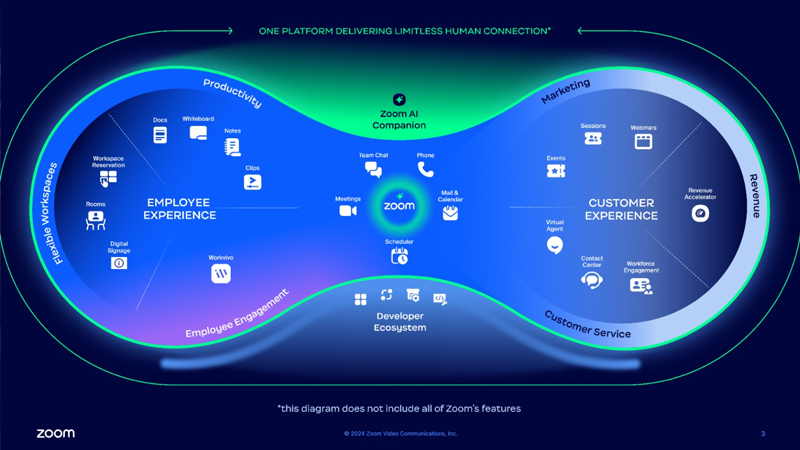
When people hear the name Zoom, the first thing that often comes to mind is video conferencing. But Zoom has evolved far beyond video meetings. Today, organizations can bring together employee collaboration and customer communications across a much broader ecosystem:
Video Conferencing + Team Chat + Calendar + Scheduling + Phone + Contact Center + WhatsApp + AI + Automation
This evolution is particularly important for organizations struggling with an increasingly common problem:
Too many disconnected communication tools.
The future of business communication is not simply about adding another application. It is about creating a more connected environment where conversations, intelligence, actions, and customer experiences work together.
Consider a typical working day. Employees hold meetings in one application. They communicate with colleagues in another. Calendars are managed elsewhere. Customers schedule appointments through another service. The business phone system operates separately. The contact center uses another platform. Customers communicate through WhatsApp, phone, email, web chat, and social channels.
Then every conversation creates additional work:
This is where the broader Zoom platform becomes particularly interesting. The opportunity is no longer just to connect people. It is to connect communication with the work that follows.
The Zoom ecosystem can be viewed from two important perspectives.
Meetings + Team Chat + Calendar + Scheduling + Phone + AI + Automation
By adding artificial intelligence and workflow automation across these experiences, Zoom can become much more than a video conferencing platform. It can become part of a broader business communications and customer experience strategy.
Zoom Meetings remains one of the best-known parts of the Zoom platform. Employees, customers, partners, and external participants can meet and collaborate regardless of location. But the meeting itself is only one part of the process.
Consider a sales meeting. A traditional workflow might look like this:
Meeting
↓
Someone takes notes
↓
Notes are shared with the team
↓
Action items are identified manually
↓
A follow-up email is prepared
↓
The next meeting is scheduled
A significant amount of administrative work can happen after the actual conversation.
With AI-powered capabilities, the workflow can become much more intelligent:
This transforms a meeting from an isolated conversation into the starting point for a business workflow.
Employees expect communication to be fast and easy. That is one reason consumer messaging applications have become common in the workplace. However, important business conversations taking place across personal messaging apps and disconnected groups can create challenges for organizations. Zoom Team Chat provides a centralized environment for business messaging and collaboration.
Teams can:
The objective is straightforward:
Sometimes arranging a 30-minute meeting takes longer than the meeting itself. “Are you available Tuesday?” “2:00 PM doesn't work. How about 3:30?” “Could we do Wednesday morning instead?” This type of back-and-forth is particularly common for sales teams, consultants, recruiters, and customer-facing employees. Calendar and scheduling capabilities can simplify the process.
For example:
Instead of treating scheduling and meetings as separate processes, they can become parts of the same communication workflow.
Phone communication remains essential for many organizations. At the same time, traditional PBX environments can create complexity, particularly for distributed and hybrid teams. Zoom Phone brings cloud-based business calling into the wider Zoom ecosystem. Depending on the organization's requirements and availability, businesses can use capabilities such as:
This creates a more integrated experience:
For organizations with multiple offices, remote employees, or international operations, bringing these communication channels closer together can simplify the employee experience.
Employee communication is only half of the story. The other major challenge is customer communication. Customers no longer interact with organizations through a single channel. They call. They send emails. They use web chat. They message businesses through WhatsApp and social channels. In some situations, they may even need video support. Modern customer experience therefore requires an omnichannel approach. Zoom Contact Center can help organizations manage customer interactions across multiple channels within a more unified customer experience environment. The goal is to provide customers with a consistent experience regardless of how the conversation begins.
In many markets, WhatsApp has become one of the channels customers naturally want to use when communicating with businesses.
But there is an important distinction:
Using WhatsApp for business communication is not the same as managing WhatsApp as part of an enterprise customer service operation.
If customer conversations remain on individual employee phones or across disconnected numbers, managing service quality and scaling the operation can become difficult.
A more structured model can look like this:
WhatsApp can then become part of a broader omnichannel customer engagement strategy alongside voice, email, chat, video, and other supported channels.
One of the most significant changes across modern communication platforms is artificial intelligence.
Consider how much time employees spend every day:
The opportunity for AI goes far beyond asking a chatbot a question.
The bigger opportunity is to embed intelligence directly into everyday communication and workflows.
For example:
AI therefore becomes less of a separate destination and more of an intelligent layer across the working day.
Meetings and conversations contain enormous amounts of valuable business information.
Decisions are made.
Tasks are assigned.
Customer requirements are discussed.
Ideas emerge.
Problems are identified.
The challenge is turning all of this information into action.
AI Companion can help users work with information generated across their communications and accelerate activities such as meeting summaries, conversation catch-up, content generation, and follow-up.
The strategic opportunity is:
This is much more valuable than simply recording a meeting.
The next stage is connecting AI with automation.
Imagine a sales meeting ending.
Instead of the process stopping there:
The objective is to reduce repetitive manual work between communication and execution.
This creates an important model for the future of work:
Artificial intelligence can also create value across multiple levels of a contact center operation.
Help customers find answers more quickly and automate common interactions.
Provide agents with relevant context, information, and assistance during customer conversations.
Analyze interactions, identify trends, improve quality processes, and provide greater visibility into customer operations.
The broader Zoom customer experience ecosystem includes capabilities and solutions such as Virtual Agent, AI Expert Assist, Quality Management, and Workforce Management.
The result is a broader vision of AI:
An organization may currently use separate tools for:
Video Conferencing
Team Messaging
Scheduling
Business Phone
Contact Center
AI
Workflow Automation
Each tool may work well individually.
But as the number of applications increases, organizations can face additional challenges:
This means the strategic question is no longer simply:
“Which application has the best individual feature?”
Organizations should also ask:
The wider Zoom ecosystem creates an opportunity to think about communications more holistically.
Meetings
Team Chat
Calendar & Scheduling
Phone
AI
Automation
Voice
Chat
Video
Contact Center
AI
The evolution of Zoom also means the platform can be relevant to multiple business functions.
Consolidate communication technologies and simplify administration.
Support hybrid work, employee communication, and collaboration.
Bring meetings, business calling, scheduling, and AI-assisted follow-up closer together.
Connect Contact Center, WhatsApp, and other customer channels within an omnichannel strategy.
Explore opportunities to automate repetitive communication-driven processes.
Develop a more unified strategy across collaboration, communications, customer experience, and AI.
Many organizations may already use Zoom for video conferencing.
But there is now another question worth asking:
Consider the systems your organization currently uses for:
Meetings
Business Chat
Calendar & Scheduling
Business Phone
Contact Center
AI Tools
Workflow Automation
Could some of these capabilities be brought together?
Could employees switch between fewer applications?
Could customer communications become more connected?
Could AI reduce repetitive work?
Could conversations trigger smarter workflows?
The answer will be different for every organization.
And that is why the objective should not be to purchase every available Zoom product.
The objective should be to design the right communication architecture for your business.
At ETGİ Grup, we help organizations evaluate Zoom beyond video conferencing and explore its broader potential as a business communications, collaboration, AI, and customer experience platform.
Depending on your organization's requirements, we can help you evaluate:
Our goal is not to add unnecessary technology.
It is to help you identify where communication can be simplified, consolidated, integrated, and enhanced with AI.
The future of Zoom is about more than meetings.
It is about connecting:
into a more intelligent communication environment for your employees and customers.
Let ETGİ Grup help you assess your current communication infrastructure and identify opportunities for consolidation, customer experience transformation, and AI-powered workflows.
[Get a Free Zoom Consultation]


.webp)